
When Does MCP Add Value to an Existing API Integration?
Share with others
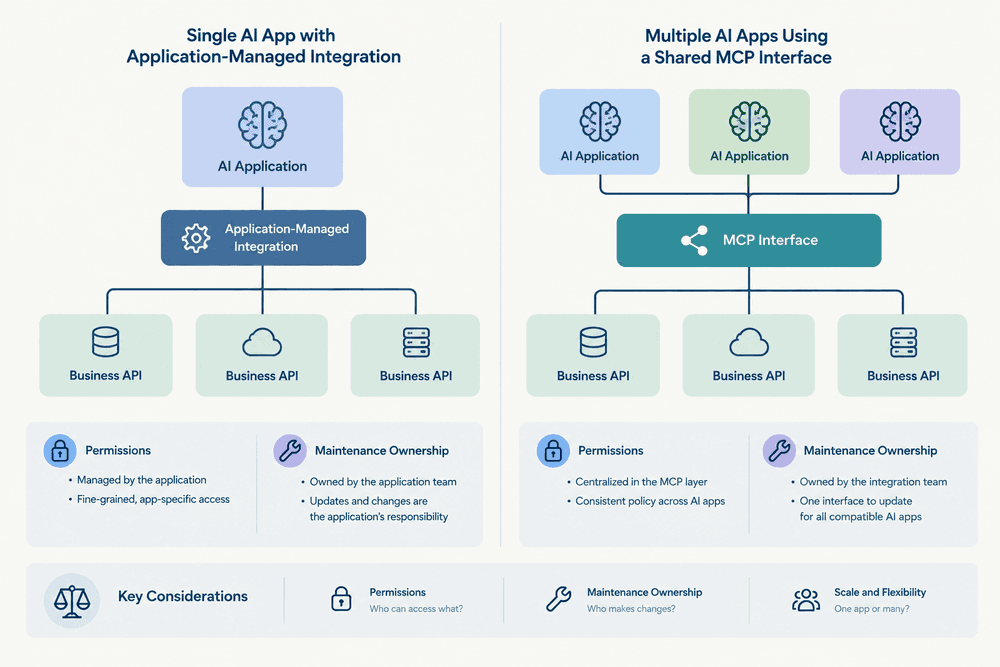
Consider adding MCP when several compatible AI applications need access to the same selected business capabilities. Keep direct API integration as the starting point when one application already handles a fixed workflow. Base the decision on reuse, permissions and maintenance ownership—not simply on whether AI is involved.
Shared AI access, not a replacement for working APIs
Model Context Protocol (MCP) defines a common interface for exchanging context and accessing tools; an MCP tool can use an existing API to carry out its work. (MCP specification) MCP also defines mechanisms for discovering available tools and invoking them. (MCP architecture overview)
AI-driven tool use does not require MCP: in OpenAI’s function-calling approach, the model requests an action, application code executes it, and the application returns the result to the model. (OpenAI function-calling guide)
The practical question is therefore not “API or MCP?” Ask whether a shared AI-facing interface would solve a concrete requirement that the existing application-managed integration does not meet. Avoid rebuilding a working connection solely to introduce another protocol.
Compare reading, creating and acting across systems
Start with the business operation rather than a technology label. Use this matrix to discuss the options with your supplier; its suggested designs are architectural recommendations.
| Task | When to start with direct integration | When to evaluate MCP | Work to specify either way |
|---|---|---|---|
| Retrieve information | One application needs a defined lookup. | Several compatible assistants need shared access to the same lookup capability. | Permitted records, returned fields and behavior when information is unavailable. |
| Create a record | A known form, event or assistant request should enter an established creation workflow. | A narrowly defined creation operation needs reuse across compatible AI applications. | Required fields, validation, write permissions, confirmation and duplicate prevention. |
| Act across systems | A fixed sequence needs explicit completion and recovery rules. | Selected capabilities need shared exposure to assistants, while a defined workflow retains sequencing and recovery. | Execution order, partial completion, retries, reconciliation and ownership of exceptions. |
MCP addresses context exchange rather than how an AI application handles its reasoning and context. (MCP architecture overview) For multi-system work, assign responsibility for deciding what happens next and what counts as completion. Do not accept “the tools are connected” as the acceptance criterion for a business process.
Separate tool visibility, approval and business permissions
Evaluate access through three separate questions:
- Visibility: which operations can the AI application discover or import?
- Approval: which proposed actions require confirmation before execution?
- Authorization: which records and operations may the requesting identity actually access?
MCP servers remain responsible for input validation and access controls when tools expose API-backed actions. (MCP architecture and tool responsibilities) Require the supplier to show where these checks happen, rather than treating an approval prompt as permission enforcement.
In OpenAI’s Responses API, allowed_tools restricts imported tools, while require_approval configures approval flows. (OpenAI MCP and connectors guide) Treat these as controls in that product, not promises about every MCP-compatible application.
Ask the supplier to trace the user or service identity from the AI application through the MCP server to the business system. Specify read and write permissions separately, including record-level restrictions. Document whether the underlying connection acts as the user or a service account, and how the intended restrictions are enforced in the selected design.
Check the selected configuration—and who maintains it
Request a compatibility record for the proposed setup, not just a statement that it “supports MCP.” Include:
- The AI application or host, and the model where relevant.
- The client and server implementations, protocol revision, SDK versions and configured modes.
- The transport, supported capabilities and authentication configuration.
- The underlying business API version and the operations exposed through it.
The July 2026 MCP specification revision introduced a stateless protocol core. (July 2026 MCP specification announcement) Do not take a release announcement as proof that deployed clients and servers support that revision.
As of 13 September 2026, the TypeScript SDK v2 documentation describes a legacy default, an automatic discovery-and-fallback mode, and a mode pinned to the July 2026 revision. (TypeScript SDK protocol-version documentation) For that SDK, check the configured mode alongside the version number; do not generalize those modes to other implementations.
OpenAI documents remote MCP connections using Streamable HTTP or HTTP/SSE and directs users to check model compatibility. (OpenAI remote MCP support) Check current documentation for the chosen host and configuration before implementation.
Alongside compatibility, assign maintenance owners for API mappings, tool names and input definitions, permissions, protocol upgrades, monitoring and recovery. Ask who updates and retests the connection when any layer changes. Compare these responsibilities with maintaining the existing direct integration, rather than assuming that a standardized interface removes maintenance work.
A fictional example: one order-status workflow, two designs
This illustrative scenario is fictional and is not a VIZUAL customer project. A distributor has existing API integrations that retrieve order status from an ERP system and create follow-up tasks in a CRM. It wants an assistant to help staff check orders and request follow-up.
Design A: application-managed calls. If one internal assistant needs a fixed workflow, start by retaining execution in application code. Specify when the assistant may retrieve information, when a task should be proposed, and when staff confirmation is required.
Design B: a shared MCP interface. If several compatible AI applications need those same capabilities, evaluate an MCP server exposing a limited order-status lookup and follow-up-task operation. Keep the existing API connections underneath and assign an owner for the shared interface.
For both designs, define what happens if the lookup succeeds but task creation fails. Require a clear completion status and a retry strategy that avoids creating duplicate tasks. Judge the designs by demonstrated reuse, support and operational control—not an assumed saving.
Questions to ask a supplier before choosing MCP
Ask for answers tied to the proposed configuration and business task:
- What needs reuse? Name the capability and the AI applications that need it. Why is the existing application-managed approach insufficient?
- What exact combination is supported? Identify the host, client, server, protocol revision, SDK modes and transport. Which capabilities and restrictions are documented for that combination?
- How is access enforced? Show the identity path, record restrictions, read/write separation and approval settings.
- Who maintains each layer? Assign responsibility for business API changes, tool definitions, authorization, upgrades and operational support.
- What happens after uncertainty or failure? Explain how a timeout is investigated, how retries avoid duplicate writes, and who resolves partially completed multi-system actions.
Before expanding the integration, request a small acceptance exercise using approved test data in the intended configuration. Include a permitted read, a denied read, an invalid record-creation request, an approved write, a repeated request and a failure partway through a multi-system action. For each, agree the expected business-system state, user-visible response and available diagnostic record. These are recommended acceptance checks, not capabilities to assume from the MCP label.
If the supplier cannot identify a useful shared capability and demonstrate support in the intended applications, keep the existing integration for now. Revisit MCP when a concrete reuse requirement emerges.
Considering how to connect AI tools to your business systems? Explore VIZUAL’s integration and workflow automation services at VIZUAL.
See other articles