
Case study: Warehouse & sales system

By Felikss Kepss, Digital marketing specialist
An agricultural spare parts company came to us with a clear goal: they wanted a reliable, fast and secure system to manage thousands of parts, documents and clients, without depending on fragile Excel files or one person’s “magic sheet”.
In this case study we’ll walk through:
- what problems they faced in day-to-day work;
- how we designed a custom warehouse and sales system;
- and what changed after going live.
The business context
The company sells spare parts for agricultural machinery – a business where timing and accuracy matter.
A typical day means:
- many ongoing orders and offers;
- stock moving in and out;
- frequent customer calls and emails;
- documents that have to be correct the first time.
When processes speed up and order volume grows, spreadsheets become harder to manage and easy to break.
Key challenges
From our discovery sessions, we focused on solving these core issues (summarised):
No single, secure source of truth
Data had to be safely accessible from different devices and roles, not locked inside one file or computer. The client asked for a secure system with access from any device and server-side storage with backups.- Slow data entry and search
Staff were used to working in a spreadsheet style. Switching between tools and windows was slowing them down. They needed:- fast, keyboard-first data entry,
very quick search for parts, clients and offers.
- fast, keyboard-first data entry,
Manual document creation
Invoices, delivery notes and credit notes had to be created and formatted manually. That takes time and increases the risk of errors.Repetitive work with client details and history
Banking information and frequently ordered parts were entered over and over again. The team wanted the system to “remember” and auto-fill based on history, not keep everything in their heads.Poor visibility over transactions
With many orders and documents, it was hard to keep a clean archive and quickly understand what had happened in the past.
Our approach
Instead of forcing the business into a generic inventory tool, we designed a custom warehouse & sales system around their real workflow.
We focused on three principles:
- Keep what works - preserve the speed and familiarity of spreadsheet-style data entry.
- Automate what hurts - remove repetitive manual work around documents and client details.
- Make it safe - centralised data, backups and clear access control.
The solution: main features
Here is what we delivered in the first release of the system:
1. Secure access and data storage
- User authentication for safe access to the platform.
- Data stored on the server, with regular backups to protect against accidental loss.
This moved the business away from files that could be accidentally deleted or overwritten.
2. Fast, familiar data entry
- An Excel-like table for entering and editing data, with full keyboard support for power users.
This kept the speed they were used to in spreadsheets, but added the structure and safety of a dedicated system.
3. Smart use of client and history data
- Automatic fill of client banking information once it has been entered.
- Use of historic data to suggest and auto-fill parts, based on what has been ordered before.
This reduces repetitive typing and helps avoid mistakes when placing similar orders.
4. Powerful search
- A lightning-fast search that can instantly find parts, customers and offers.
When somebody calls and asks, “Do you have this part?”, staff can respond quickly instead of “digging” through multiple sheets.
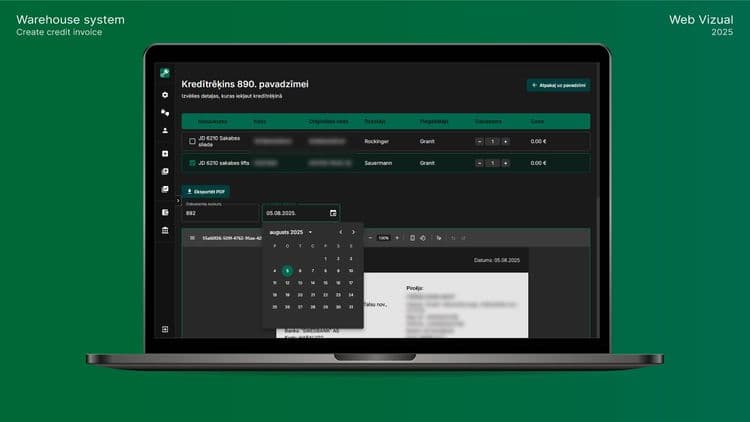
5. Automated document generation
- One-click PDF generation for:
- Invoices;
- delivery notes;
- credit notes.
- Invoices;
This ensures documents are consistent and correctly formatted every time.
6. Complete archive and clear overview
- A full archive of all finished and saved transactions, easily searchable and reviewable.
This makes it easier to answer questions like:
- “What did we supply this client last season?”
- “How often do we issue credit notes and why?”
7. Modern, user-friendly design
- A clean, modern interface that is easy to learn for the whole team - not only for the person who originally built the spreadsheet.
Impact on the business
Even without sharing specific numbers, we can summarise the impact in three areas:
- Time saved per order
Faster search, auto-filled data and one-click document generation mean each order takes less time to process. Over dozens or hundreds of orders per week, this adds up to many hours.
- Fewer errors and less rework
With structured data, validation and history-based suggestions, the system helps prevent mistakes that would otherwise lead to corrections, credit notes or unhappy customers.
- Better visibility and control
A centralised archive with secure access and backups gives management a clearer view of what is happening in the business: what was sold, to whom, and under which documents.
In short: less manual work, more reliability, and a calmer day-to-day operation.
What you can learn from this project
If you run a warehouse or inventory-heavy business and still rely on spreadsheets, here are some questions to ask yourself:
- Do we have a single, trusted place where all data lives?
- How many steps in our process are still manual copy-paste?
- How much time does it take to create and correct documents?
- Can anyone on the team understand the system, or only one person?
- How confident are we about backups and access control?
If the honest answers make you uncomfortable, it may be time to move from spreadsheets to a custom system.
Thinking about a similar system?
At Vizual, we help companies turn real-world workflows into practical, custom web software - starting from a very focused first version and improving over time.
If you’d like to talk about your warehouse or inventory process, you can:
- fill out the new client form, or
- book a short call to walk through your current workflow.
About author
Felikss Kepss, Digital marketing specialist
Felikss has been working in digital marketing for 5 years. He knows both long-term and short-term marketing methods and always tries to find the best solution for our clients.
See other articles
 Uz Latvijas lapu